YallaFlow
1.4.1Set the project up once, then press Start →

Open source · for Claude Code and Codex

YallaFlowGive AI your project, not just your prompt.

YallaFlow gives your coding agent a reviewed memory of your codebase, a workflow sized to each request, and evidence before anything is called done.

npm install -g yallaflow
  • MIT license
  • Runs locally, no telemetry
  • Node.js ≥ 20.16.0
  • Arabic and English
Conceptual illustration of a session, not a YallaFlow screen.

Seven weeks, seven releases, every change proven

  • 7public releases on npm
  • 78work items, each tracked by YallaFlow itself
  • 348recorded verification runs
  • 1,023automated tests on Node 20, 22 and 24
  • 30klines of plain JavaScript, no build step
  • 4runtime dependencies, zero telemetry

Counted from the repository at v1.4.1. From the first commit on 19 Sep 2026 to 1.4.1 on 8 Nov 2026.

The console

Your projects, requests and running app on one screen

yallaflow console opens a local web app in Arabic or English, light or dark. Write requests in your own words, watch each one move to a proven Done, and start your app with one button. These are real screens.

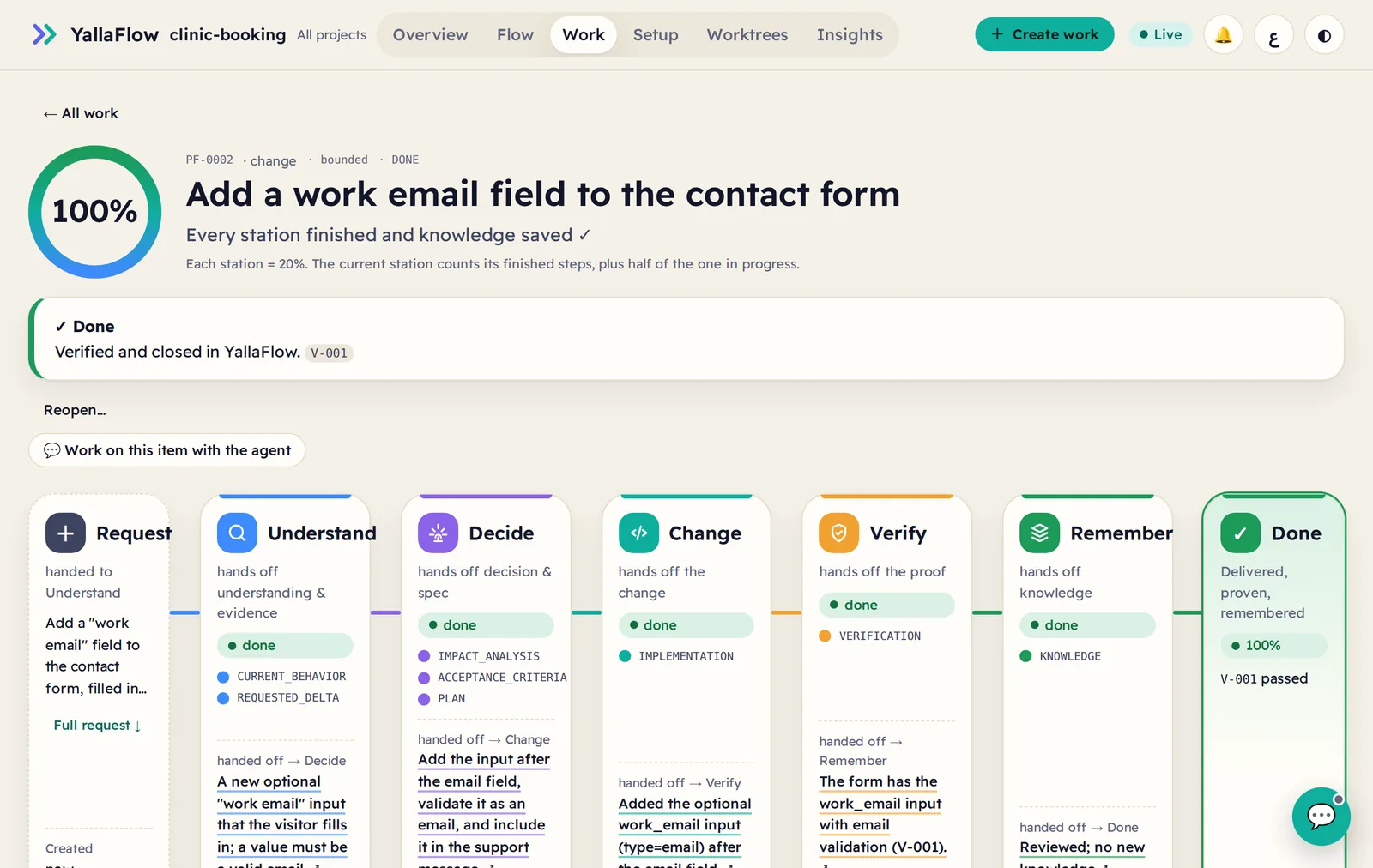
A work item at 100%: every station done, verified with evidence V-001, and remembered
Done means provenEvery request moves through Understand, Decide, Change, Verify and Remember. YallaFlow computes the % from evidence. It never closes an item because the agent said so.
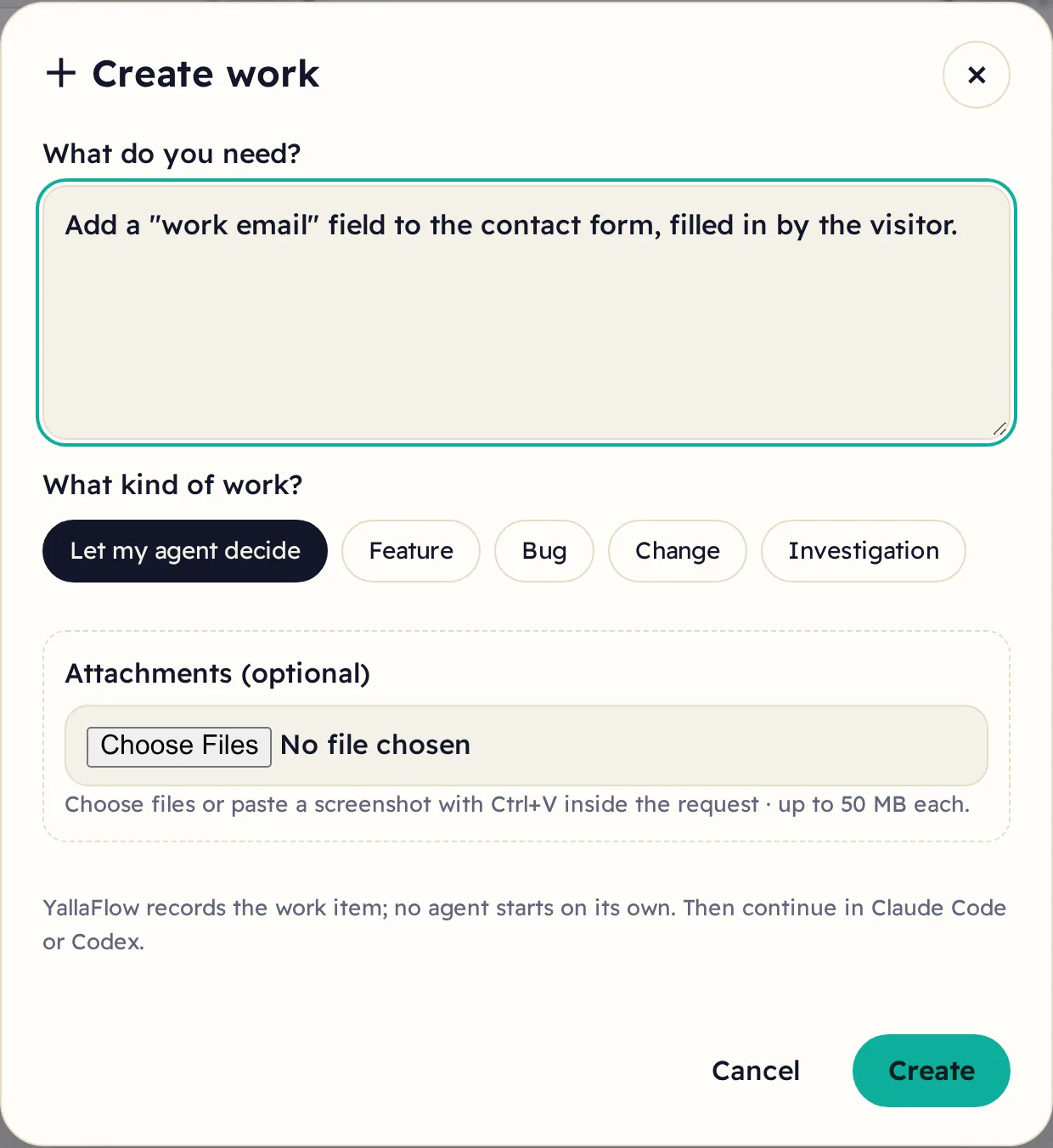
The Create work dialog with a request written in plain words
Create work in your own wordsDescribe it the way you'd tell a colleague, and attach a screenshot or a BRD. No agent starts on its own.
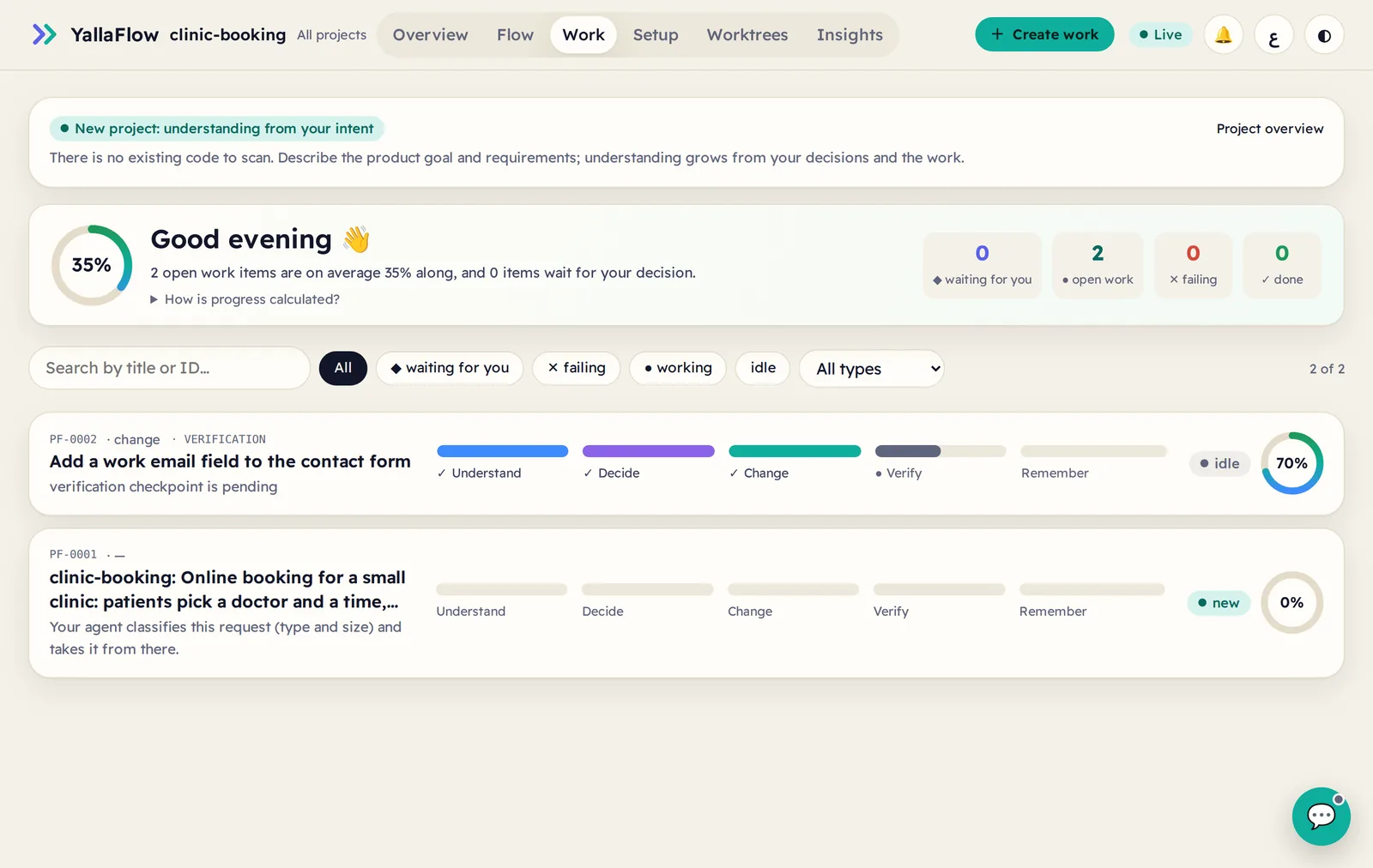
The Work board listing items with their stations, next step and completion
Watch every request moveEach item shows its stations, its next step and who owns it, and what is waiting for you.

Real work, not a demo

A real project, run on YallaFlow every day

DmagAI is the production studio of the دماغ AI YouTube channel: Egyptian-Arabic videos built with Claude Code, Remotion and ffmpeg, plus the tools around them. Since 21 October 2026, every change in it has gone through YallaFlow. These screens are from that project, unedited.

  • 64work items in 3 weeks
  • 61done, each with evidence
  • 216verification runs recorded
  • 238requirements and acceptance criteria
  • 66current facts in project memory
  • 155commits
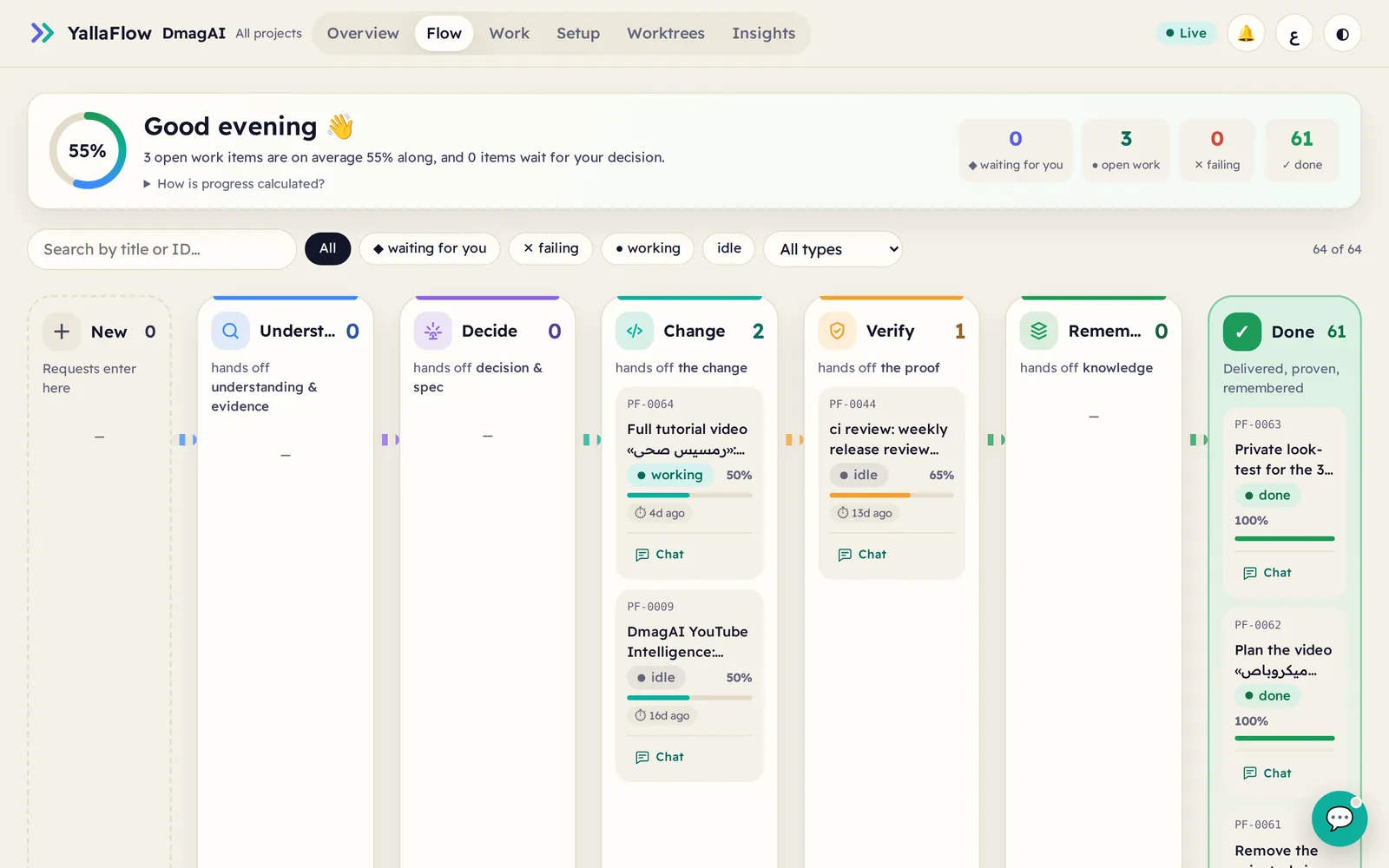
DmagAI in the YallaFlow console: the Flow board with 61 work items done, 3 open and none failing
The whole project at a glanceEvery request sits on its station, from New to Done. Nothing is done without proof.
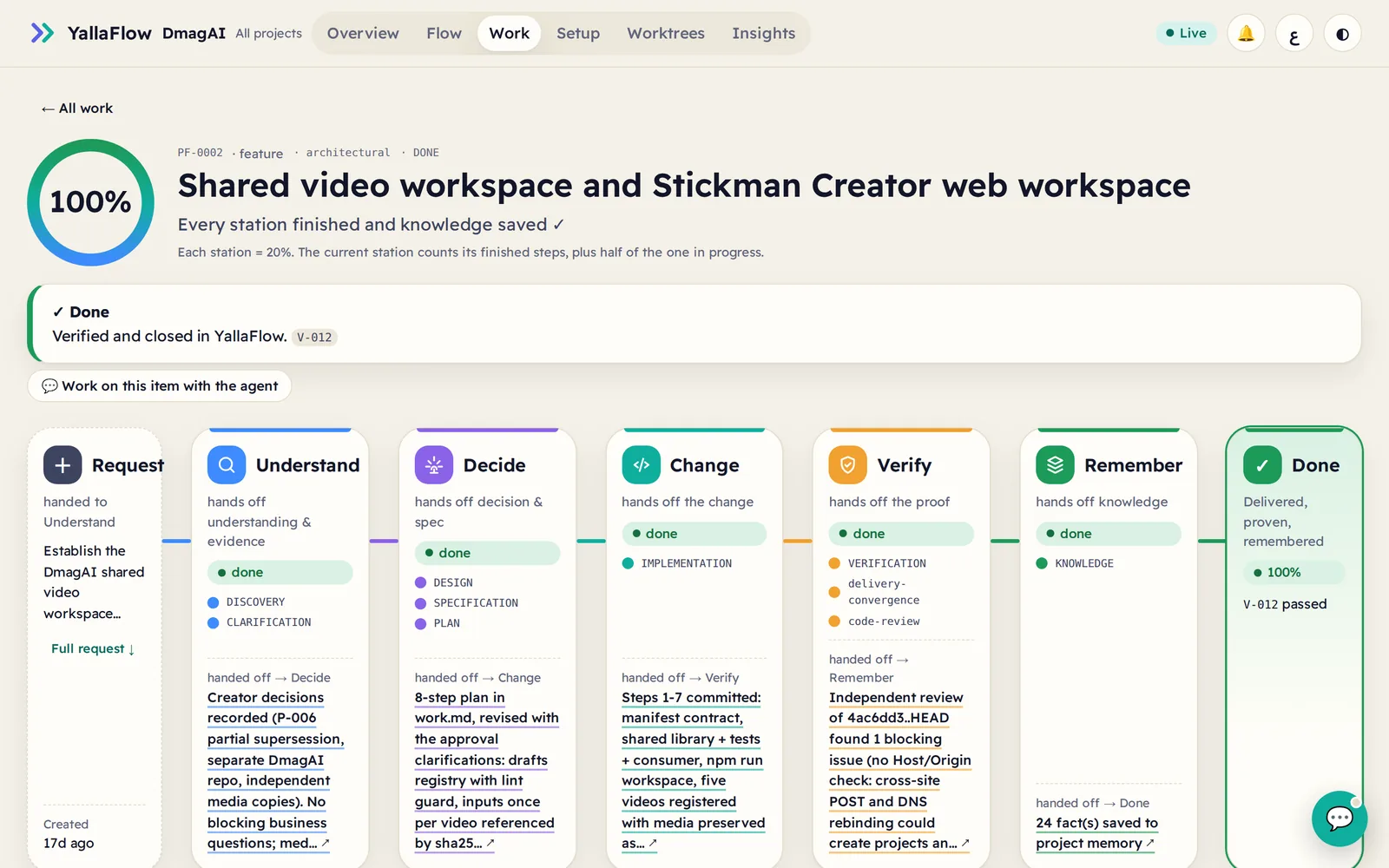
An architectural work item at 100 percent: design, specification and plan, implementation, verification with code review, and 24 facts saved to project memory
One feature, every decision keptDesign, spec and plan; the change; an independent review that caught a blocking issue; 24 facts saved for the next session.
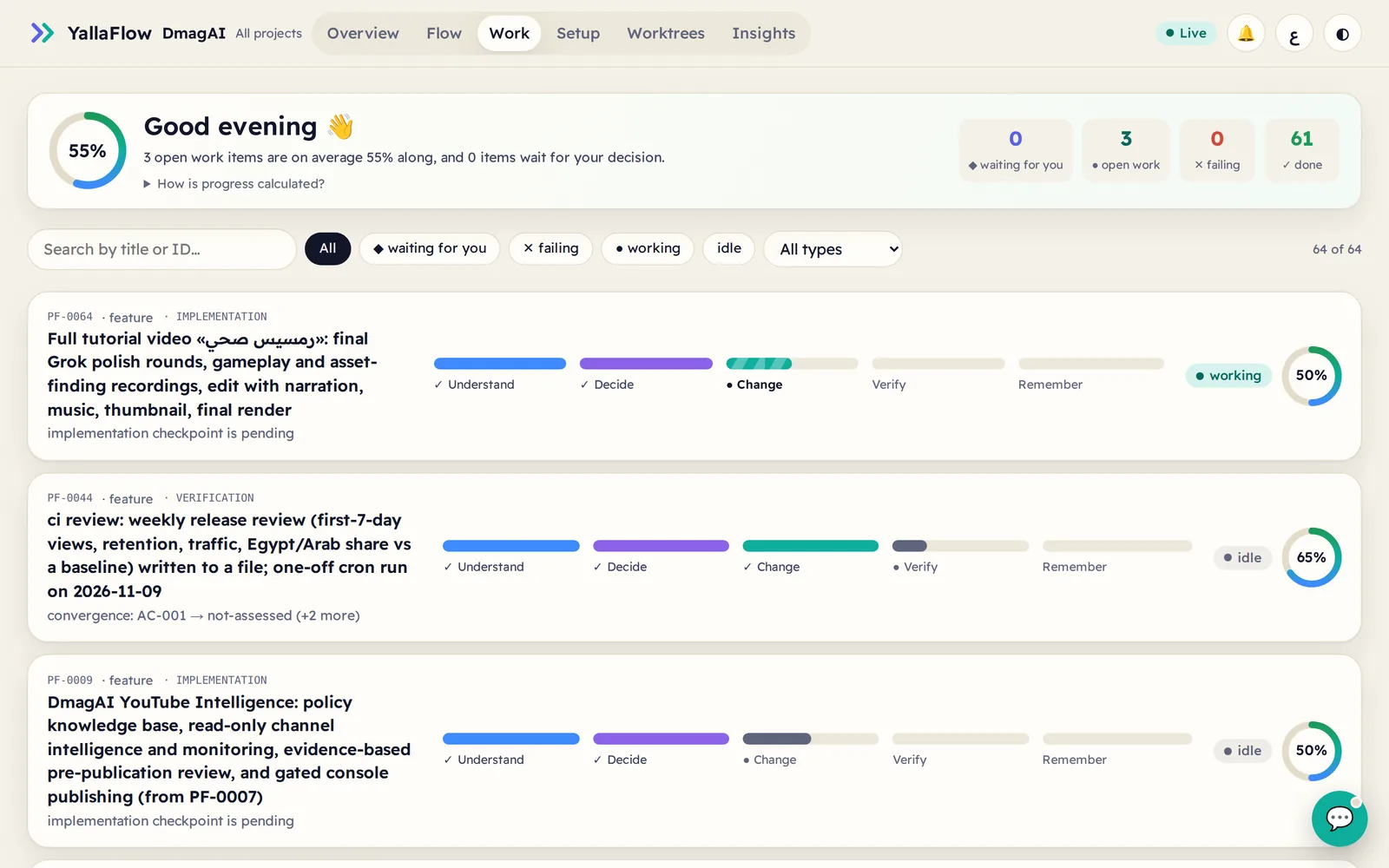
The Work board of DmagAI listing open work with stations, progress and the next step
Open work, honestlyEach open item shows exactly what is pending, for example "implementation checkpoint is pending".

Recorded in real sessions

Two agents, one work item

Codex picked up where Claude Code stopped

Claude Code built phase 1 of an expense-approval policy, and 24 tests passed. Codex then got only Continue the work in progress. It read YallaFlow's records, built the rest and finished with 29 tests and 9/9 acceptance criteria satisfied.

QC that only counts what ran

9/9 browser scenarios passed

The agent planned QC from the acceptance criteria and ran it in a real browser. All 9 scenarios passed, including a forged request the server refused, and the agent listed what it did not cover.

Changing your mind is safe

Reopened, re-assessed, done again

After review, a finished item was reopened with a reason. YallaFlow raised an impact assessment, the requirements were revised first, and the item was re-verified and closed again.
The stories come from a technical showcase recorded inside DmagAI (work item PF-0051). The figures were counted from DmagAI's own YallaFlow records on 8 November 2026.

New in 1.4.1

Set the project up once. Then just press Start.

Running your app is now part of the console. That includes the Docker stack in a parent folder, its database, and its *.localhost sites.

  1. 1

    Ask the agent how it runs

    Your agent reads the real configuration (Compose, vhosts, the folders above the project) and proposes services, start order, ports and links. Every item carries its confidence and evidence. Its investigation is read-only and never opens .env.

  2. 2

    Review and trust, once

    You see exactly the command, folder and files the trust is bound to, then type the service id. Any later change ends the trust until you review it again.

  3. 3

    ▶ Start project

    Setup becomes your Run page. It shows one state, Start and Stop, the apps to open, and a row per service with logs. Services start in dependency order.

  • Nothing runs on its own
  • Shared stacks are never stopped by mistake
  • No secret values in plans or logs
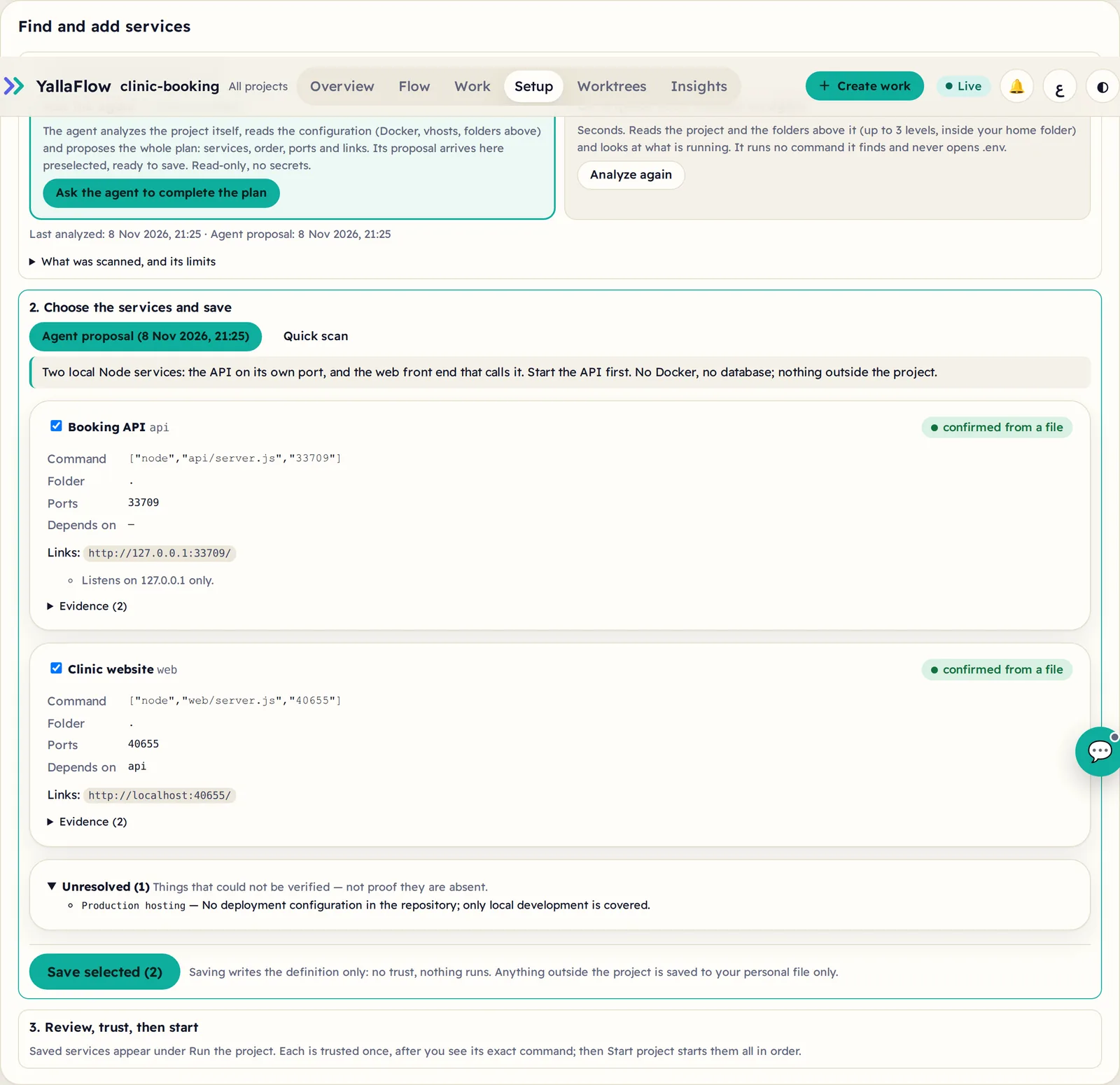
Setup: Ask the agent is recommended; the agent's plan lists two services with confidence and evidence
The agent's plan, with evidenceThe proposal arrives preselected, so saving is one click. What can't be verified is marked unresolved.
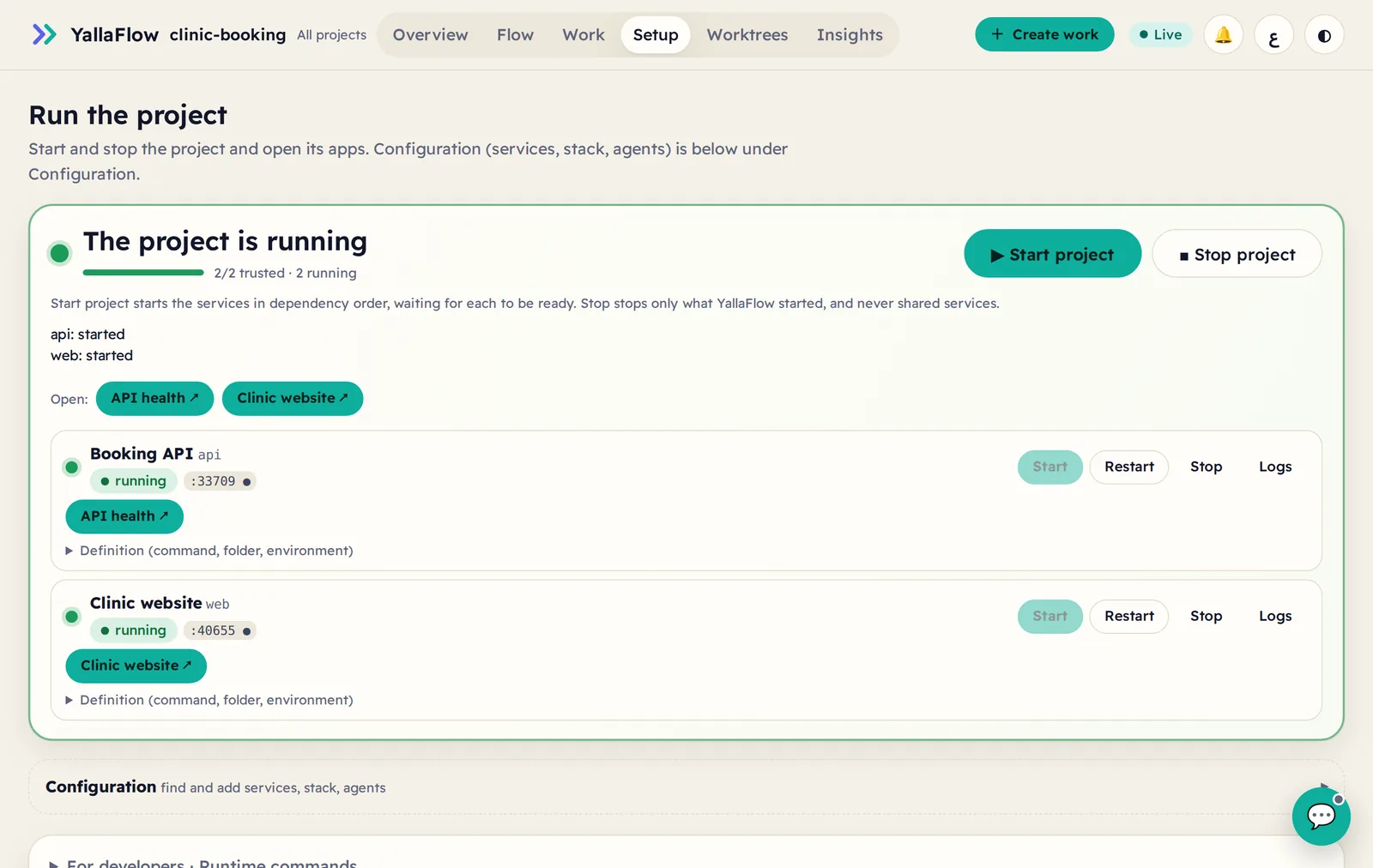
Run the project: the project is running, with Start project and Stop project buttons, Open links and one row per service
One page to run itStop project stops only what YallaFlow started. It never stops a stack other projects share.

Watch

YallaFlow in 30 seconds

Why a fast coding agent still needs your project's context, and how YallaFlow structures the work around it.

  1. 0:00AI can write code fast, but code is only part of the job.
  2. 0:06Requirements, decisions and business rules get scattered.
  3. 0:12Meet YallaFlow: understand, specify, build, verify.
  4. 0:19From requirements to verification, with decisions tracked.
  5. 0:25Open source and built for developers.

Want the full walkthrough, from setup to delivery? Watch the full demo on LinkedIn (opens in a new tab) 8 min

Animated 30-second overview. Its key points appear as on-screen text and in the chapter list on this page. It ends with the YallaFlow repository on GitHub.

Why YallaFlow

The context your agent is missing

You describe the intent. YallaFlow keeps the durable state around the agent; the agent does the reasoning and the coding.

Persistent project memory

A reviewed understanding of your codebase, backed by evidence and flagged when that evidence changes.

Adaptive workflows

Bugs, features and investigations each get a lifecycle sized to the work. Small stays light.

Verified delivery

Nothing is done without fresh verification evidence, checked against what was asked.

Agent continuity

Every new session and every teammate starts from the approved understanding and recorded progress.

How it works

From request to remembered result

Day to day you talk to your agent. YallaFlow calls no AI model itself and sends no telemetry.

  1. Initialize

    yallaflow init connects Claude Code and Codex. Existing instruction files are kept.

  2. Describe the work

    Ask your agent in plain words. No need to say “use YallaFlow”.

  3. Approve once existing projects

    The agent maps the codebase without changing code, shows what it found and missed, and waits for your Approve.

  4. Route and build

    The request gets the right workflow, from a quick fix to a reviewed plan.

  5. Verify and remember

    Fresh evidence first. What was learned becomes reviewed project knowledge.

After the one-time approval, your original request continues automatically. Read the end-to-end guide.

Capabilities

What YallaFlow covers

Core capabilities are always on. Items marked Optional run only when you ask.

  • Claude Code and Codex

    First-party setup through each agent's instruction file.

  • Project onboarding

    A human-approved baseline that records coverage and limits honestly.

  • Knowledge persistence

    Facts, rules and decisions as files in your repository. Project memory

  • Workflow tracking

    Resumable lifecycles for bugs, features, changes and more. Workflows

  • Verification and evidence

    An append-only ledger of the checks that actually ran.

  • Shared Projects

    One understanding for the team, through ordinary Git. Shared Projects

  • Console in Arabic and English

    Create work, the flow, every item's evidence, and Insights, all in your browser. Console

  • Run your project

    Agent-proposed services, trusted once, started and stopped from one page. Runtime

  • New project wizard

    Idea, stack, environment and an exact review before anything is created. New project

  • Connected requirements Optional

    Import a GitHub, Jira or Azure DevOps ticket as a preserved source.

  • AI QC with Playwright Optional

    Browser checks planned from acceptance criteria; passed only if actually run.

  • Smart Demo Optional

    You approve the scenarios before anything is recorded. Not test evidence. Tickets, QC and demos

Install and upgrade

Get started in three steps

Works on a new or an existing repository. Requires Node.js ≥ 20.16.0. Install it as a tool, never as a dependency of your app.

  1. npm install -g yallaflow
  2. yallaflow init
  3. describe the work
  4. yallaflow console

TerminalInstall once, connect each project

$ npm install -g yallaflow
$ cd your-project
$ yallaflow init
$ yallaflow console      # optional: open it in your browser

Starting fresh? Use All projects → New project in the console instead of init.

PromptThen ask Claude Code or Codex

  • Fix invoice totals.
  • Build an anonymous employee survey platform.

These are messages to your agent, not terminal commands.

UpgradeWhen a new version is out, you decide when to upgrade

  1. npm install -g yallaflow@latest
  2. yallaflow upgrade status
  3. yallaflow agent refresh
  4. yallaflow doctor
  5. restart the console
$ npm install -g yallaflow@latest   # or an exact version: yallaflow@1.4.1
$ yallaflow upgrade status          # read-only: what, if anything, needs attention
$ yallaflow agent refresh           # only if the agent contract is reported outdated
$ yallaflow doctor

YallaFlow never updates itself. Your work items, project memory and sources are kept as they are. Restart yallaflow console so the browser loads the new version. Updating in detail

Built in the open

YallaFlow is built with YallaFlow

Every change to YallaFlow goes through YallaFlow. That means a routed work item, its checkpoints, fresh verification evidence, and a knowledge review before it is called done. The records are public, in the repository's .yallaflow/ folder.

  • 78 work items, from the first prerelease to 1.4.1
  • 348 verification runs, failures included, kept in an append-only ledger
  • 77 current facts in its own project memory, each with evidence
  • 13 internal prereleases before the first public version

Browse the work records

  1. 1.4.1Project Setup and Run: the agent proposes how it runs; you press Start
  2. 1.4.0Engineering workspace: New project wizard, Overview, work lifecycle
  3. 1.3.0Agent Workspace: work with Codex from the console
  4. 1.2.0Flow Console, read contract and workspace lock
  5. 1.1.0Connected requirements, AI QC and Smart Demo
  6. 1.0.1Route engineering work before the first edit
  7. 1.0.0First public release on npm

The maker

Built by Mohamed Amer

I built YallaFlow because a fast agent without project context still ships the wrong thing. It is built the way it asks you to work: together with AI coding agents (Claude Code and Codex), with YallaFlow governing every change.